Sketchfab alternative for client review: Sketchfab vs MeshMarkup
Sketchfab is built to publish and embed 3D; MeshMarkup is built for private client review with pinned notes, versions and sign-off. When to use which, or both.
If you need a client to review a 3D model privately, leave feedback on it and approve a final version, MeshMarkup is built for exactly that loop: clients pin notes to the model without an account, you set each note's status, upload revisions with open notes carried across, and the client signs off. Sketchfab is built for something different: publishing, embedding and showcasing 3D to an audience, which it does very well. Many studios use both.
This comparison reflects each product's public information as of September 2026. Sketchfab's features and plans can change, so check sketchfab.com/plans for the current details. If you're weighing more than these two, our round-up of 3D model review software alternatives compares Sketchfab with Autodesk Viewer, eDrawings, ShareCAD and others.
What each one is built for
Sketchfab describes itself as a platform to publish, share and discover 3D content on the web, mobile, AR and VR. Its strengths are the viewer and its reach: models embed on any website, it has a large public community of creators, a library of free downloadable models, a physically based material editor, and on paid plans app-free AR from a mobile browser. If you want the world, or a product page, to see your model, it's the obvious choice.
MeshMarkup is private by design. Nothing is public, there's no community or discovery, and there's no embed code. Every model is shared through a review link to one version, and everything on the page is about getting feedback and a decision: notes pinned to the geometry, replies, statuses, versions, the ghost comparison, sign-off and a printable round report.
Sharing a model privately with a client
On Sketchfab, private uploads come with the paid plans. The plans page describes them as letting you choose which models show on your public profile and which are unlisted, only accessible via URL, with an optional password.
In MeshMarkup, every model is private and every review link is its own URL:
- You choose what the link allows: Look only, Leave feedback or Sign it off.
- You can set it to expire after 7 or 30 days, or never.
- Each link shows how many times it's been opened, and you can switch one off without affecting the others.
- There's no password option. Access is by the link, so give each client their own and switch it off when you're done.
See review links and permissions.
Annotations and client feedback
Sketchfab's annotations are numbered points with text that the model's author adds in the 3D settings editor, to explain or present the model. The number per model depends on the plan (see the table). Its help centre describes them as something the author creates; it doesn't describe a way for viewers to add their own.
MeshMarkup's notes work the other way round: the client writes them. On a Leave feedback link they click the spot they mean, type their name and a note, and it appears as a numbered pin with the camera angle they were looking from. You reply in a thread under it, and they can reply back.
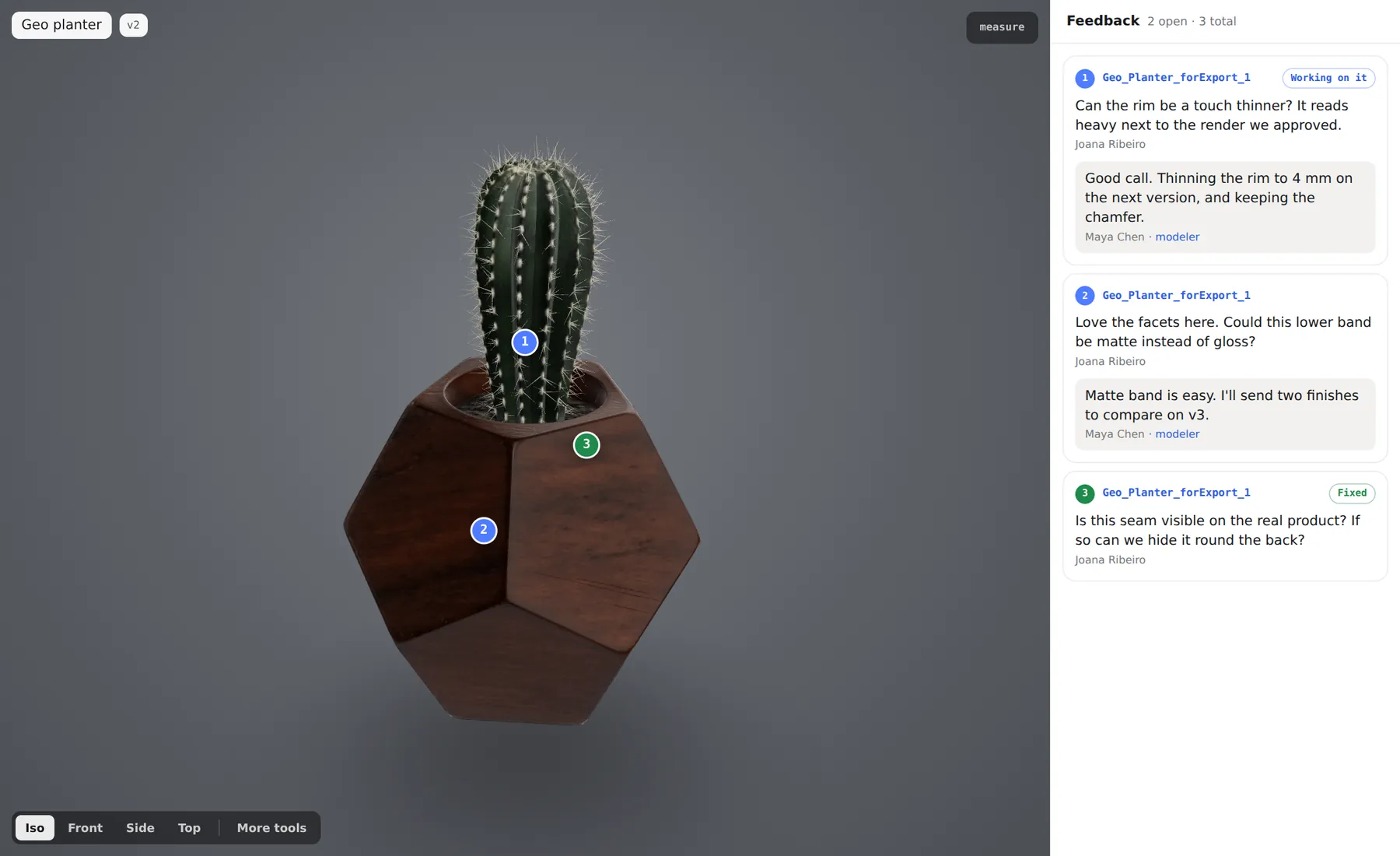
Clients don't create an account, and reviewers are free and unlimited on every MeshMarkup plan. More in what your client sees.
Sketchfab vs MeshMarkup at a glance
| Sketchfab | MeshMarkup | |
|---|---|---|
| Built for | Publishing, embedding and showcasing 3D | Private client review and approval |
| Public profile and community | Yes | No; nothing is public |
| Embed on your website | Yes, with more branding controls on higher plans | No |
| Private sharing | Private uploads (unlisted, optional password) on Pro and above | Every model is private; links per version, with expiry and revoke |
| Notes on the model | Annotations written by the model's author: 10 per model on Basic, 20 on Pro, 50 on Premium, 100 on Enterprise | Notes left by clients, pinned to the spot they clicked, with threaded replies |
| Note statuses | Not listed on its plans page | Open, in progress, resolved, won't fix |
| Versions | Not listed on its plans page | Upload v2, v3 onto the same model; open notes carried across; ghost comparison (Solo and above) |
| Client sign-off | Not listed on its plans page | Client approves a version, blocked while notes are open (Solo and above) |
| AR in a mobile browser | Yes, on paid plans | No |
| Upload size | 100 MB on Basic, 200 MB on Pro, 500 MB on Premium and Enterprise | Counts towards your plan's storage, from 50 MB on Free to 2 TB on Pipeline |
| Price | Basic free; Pro $15 and Premium $79 a month, billed yearly; Enterprise on quote | Free; Solo 29, Studio 89, Pipeline 249 a month (€ or $), or two months off yearly |
"Not listed on its plans page" means the feature isn't among those Sketchfab lists; it doesn't mean you can't manage it another way, such as uploading a revision as a new model.
Rounds, revisions and sign-off
Most client jobs take more than one round. In MeshMarkup, a revision goes onto the same model with Upload v2. Notes still open or in progress are copied across with their replies, so nothing the client raised is lost. Compare draws the previous version as a ghost behind the new one so you can see what moved; see versions and comparing.
When the last round is clean, a Sign it off link lets the client approve that version. The approval is refused while any note is open, and it's recorded with the name the client typed and the date. The round report turns the whole round into a PDF you can file with the job. See client sign-off and round report.
When to use which, or both
Use Sketchfab when:
- The model is finished and you want people to find it, or to see it on your site or a product page.
- You want a public portfolio, community feedback or discovery.
- You need AR from a phone's browser, or deep control over the viewer through its Viewer API.
Use MeshMarkup when:
- The model is work in progress and the client's comments need to be answered, tracked and closed.
- You're working through several rounds and want every revision on one model with its history.
- You need a record that a named person approved a specific version.
- The client shouldn't need an account, and the model mustn't appear anywhere public.
Use both by keeping the review private and publishing the result: run the rounds and the sign-off in MeshMarkup, then upload the approved model to Sketchfab to show it off. MeshMarkup doesn't connect to Sketchfab, so you upload the final file there yourself.
To try the review side, see send a 3D model to a client for feedback. For MeshMarkup's plans and limits, see plans and billing.
Was this guide helpful?
Related guides
Get feedback on the model, not on a screenshot
Upload a model, send one link, and your client clicks the exact spot. Free to start — no card.